STEP 1
See the full path
Open one visual roadmap and understand what to do next without digging through scattered pages.
Panday turns confusing career requirements into a clear, visual roadmap. Explore the flow, get AI guidance with sources, and track your progress from entry to Red Seal.
No payment required. Use guest mode instantly, or sign up to save progress and personalized data.


Everything you need to navigate your skilled trades journey with confidence
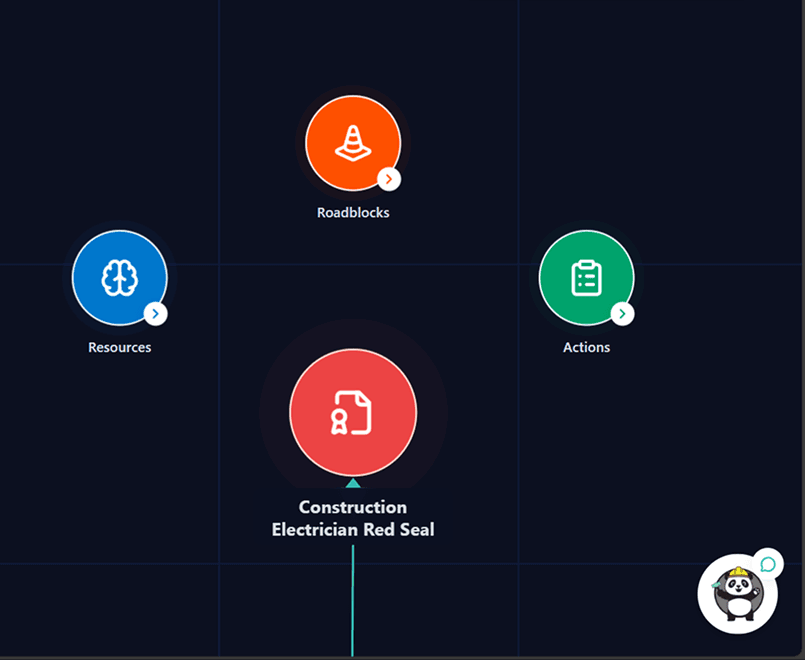
Navigate your career path with clear, visual node-based roadmaps. Track your progress from foundation programs through each apprenticeship level to Red Seal certification.
Create personalized checklists, reminders, and study notes directly on your roadmap. AI automatically positions them near relevant milestones with intelligent collision avoidance.
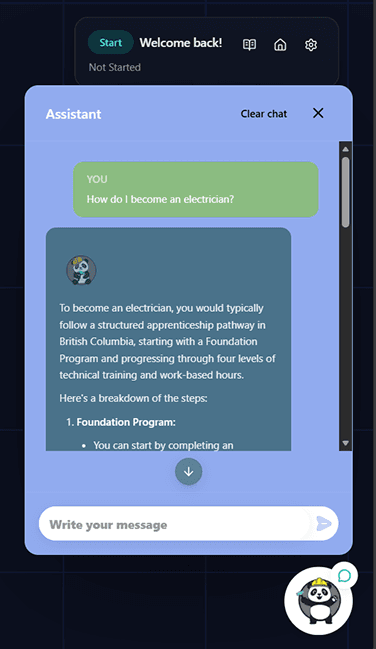
Get instant, accurate answers to your questions. Our AI chatbot understands context and provides personalized guidance for your specific career stage.
Every AI response is backed by verified documents from ITA BC, government resources, and official trade guides. See source citations with every answer for complete transparency.
Access training materials, certification guides, workplace safety resources, and exam prep tools. Everything organized by your current level and specialization.
Mark milestones complete, save your progress, and visualize how far you've come. Your personalized dashboard shows your path from entry to certification.
Choose your current level and entry path to personalize the roadmap instantly.
Open a roadmap node to see eligibility, resources, and next actions.
Ask the AI assistant questions and review source-backed answers.
Track checklist completion, save chat history, and continue where you left off.
Product Walkthrough
Built for clarity first. Every screen helps users understand what they need, what to do now, and what comes next.
Open one visual roadmap and understand what to do next without digging through scattered pages.
Use the built-in AI chat while viewing the roadmap. Responses are grounded in source documents.
Check off tasks, save custom notes, and return anytime with your progress and history intact.
The chat assistant answers questions in plain language and points to source material when it responds. That means users can move faster while still seeing where the guidance comes from.